
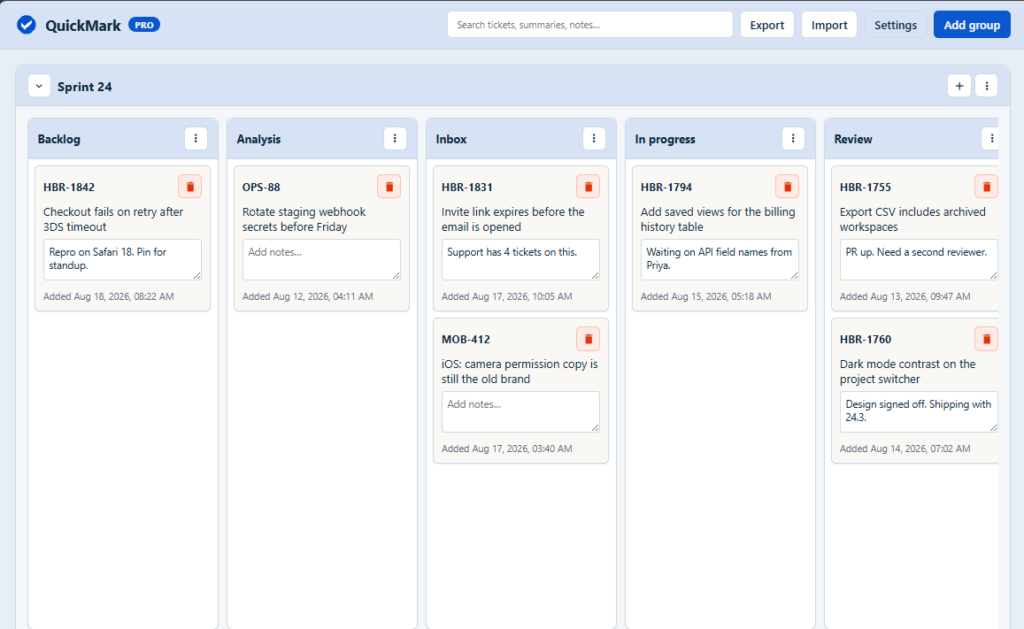
Bookmark Jira issues into groups and lists. Open a kanban-style board from the toolbar. Mark an issue from the page itself—next to Watch, or as a draggable floating button.
Why it exists
Jira is where work lives. It is not a place to park the issues you keep coming back to.
QuickMark gives you a personal board: groups, lists, and cards. Bookmark an issue in one click, then drag cards between lists the way you already think about work.
An issue can live in only one list, so the board stays a real queue instead of another pile of stars.
What you can do
Mark issues from Jira
A QuickMark button sits to the left of Watch by default. In Settings you can switch to a floating button instead—drag it around the page; it snaps to the left or right edge and remembers its position. Pick a list, search, or create a new one. Archived groups and lists stay out of that picker. If the issue is already on an active list, you can remove it. If it is only archived, it does not show as marked. Marking it again moves that same issue onto the list you pick.

Run a personal kanban board
Groups run horizontally. Lists sit inside each group. Cards are the issues. Each list name is unique inside its group. Search tickets, summaries, and notes. Switch the board between Active, Archived, and All. Drag to reorder when you are viewing All.

Open all in Jira
Every list includes an Open all action. Click it to open a Jira search tab for each domain in the list—for example, issue in (KAN-1,KAN-2) on your Cloud site. Open all follows the view you are on, so Active skips archived issues. You can also show Open all on groups, choose inline or menu placement, and optionally group the opened tabs in Chrome.
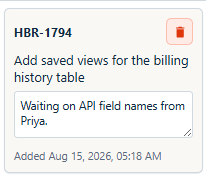
Keep notes on cards
Add context you do not want in the Jira comment thread. Notes are included on the free plan.
Archive without deleting
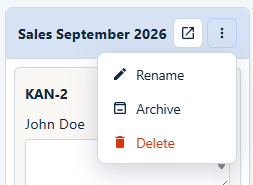
Archive a group, a list, or a single issue to hide it from the active board. Archived issues still count toward the free limit. Restore them whenever you want them back.
Import and export
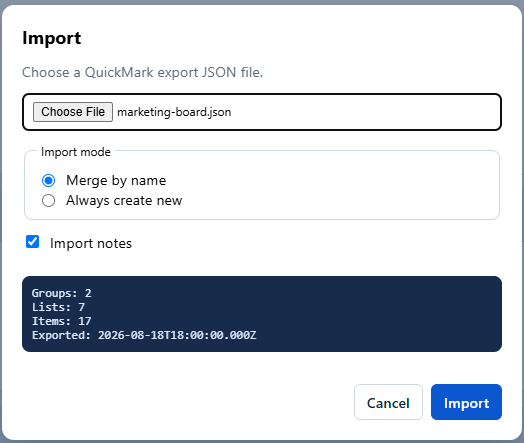
Share or back up selected groups and lists as JSON. Merge by name or always create new. Duplicate issue keys are skipped and reported. Pro only.
Use your own Jira host
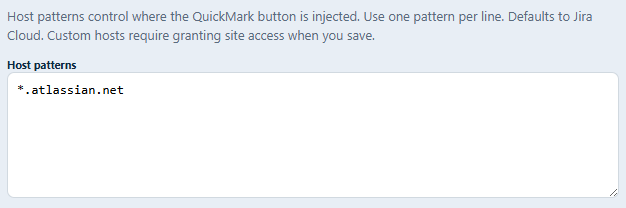
Cloud works out of the box. Add Server or Data Center hosts in Settings. Custom hosts are a Pro feature.
Data stays in the browser. Nothing is sent to a QuickMark server.
How it works
- Install QuickMark in Chrome or Edge.
- Open the board from the toolbar icon. Create a group, then lists.
- Open a Jira Cloud issue and click QuickMark next to Watch—or use the floating button if you prefer that in Settings.
- Use Open all on a list to jump into Jira search for every bookmarked issue in that list.
- For Server or Data Center, add the host in Settings, approve access, and reload the Jira tab.
Free vs Pro
Keep the board you already use, and unlock unlimited lists, notes, import/export, custom Jira hosts, and advanced Open all options.
| Feature | Free | Pro |
|---|---|---|
|
QuickMark button on Jira issues
|
Yes
|
Yes
|
|
Floating button placement
|
Yes
|
Yes
|
|
Groups
|
Unlimited
|
Unlimited
|
|
Lists
|
Unlimited
|
Unlimited
|
|
Bookmarked issues
|
50
|
Unlimited
|
|
Archive groups, lists, and issues
|
Yes
|
Yes
|
|
Open all on lists
|
Yes
|
Yes
|
|
Open all on groups
|
Yes
|
Yes
|
|
Group opened Jira tabs
|
Yes
|
Yes
|
|
Notes on cards
|
Yes
|
Yes
|
|
Import / export
|
Yes
|
Yes
|
|
Custom Jira hosts (Server / Data Center)
|
Yes
|
Yes
|
Free includes 50 bookmarked issues with as many groups and lists as you need. Archived issues count toward that 50. Pro unlocks unlimited issues.
Contact
Questions, feedback, or billing help? Email me@cocanio.com.